# Glossary
# IQBID Glossary
# Managing Co-founder
...
# The AI agent
**AI agent** – is a software entity that interacts with its environment, perceives it, makes decisions, and performs actions to achieve predefined goals. This is an autonomous or semi-autonomous system that uses artificial intelligence to perform tasks on behalf of the user.
#### Key characteristics of an AI agent
An AI agent collects information about its environment through various sensors, data, APIs, or text. Based on the received information, the agent makes decisions, guided by its goals. The AI agent performs actions in its environment to achieve the set tasks.
AI agents can be autonomous or semi-autonomous, meaning they can act without direct human intervention.
##### Examples of AI agents
- **Chatbots:** Used to automatically respond to user requests.
- **Copilots:** Help users with various tasks, such as writing code.
- **Advanced AI assistants:** Can perform complex workflows autonomously.
- **Robots:** The use of AI allows robots to make decisions and interact with their environment.
Unlike regular programs, AI agents can adapt to changing conditions, plan steps ahead, remember the context of past interactions, and use various tools to impact the outside world.
##### Application of AI agents
AI agents are widely used in various fields, such as:
- **Customer service**: To automatically answer questions and solve problems.
- **Business:** To automate processes and increase efficiency.
- **Healthcare:** For diagnosing diseases and developing treatment plans.
- **Robotics:** For controlling robots in the real world.
> Currently, there is an innovative application of **AI agents** on the [**IQBID Pods**](https://pods.iqbid.io) platform, which helps entrepreneurs acquire a profitable online business in a short time and with minimal investment.
# AI
# What are MCP servers?
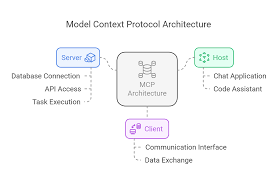
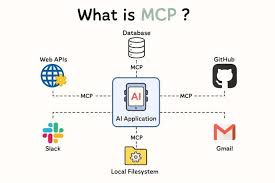
In 2024–2025, a quiet but revolutionary shift occurred in the world of artificial intelligence. Anthropic introduced the **Model Context Protocol (MCP)** — an open standard that is being compared to USB-C for AI. And the **MCP server** has become a key element of this new ecosystem. If AI models used to be like smart but blind conversationalists, limited by their training data, now they can "connect" to the real world: files, databases, APIs, GitHub, Slack, and even Kubernetes clusters.
[](https://kb.iqbid.io/uploads/images/gallery/2026-03/image-1774364944477.png)
This article is a complete breakdown: from a general overview to real-world examples. We will explore why MCP servers solve long-standing pain points in AI development and why in the coming months everyone will be talking about them — from developers to CEOs of major companies.
### Understanding MCP Servers: A General Overview
**MCP (Model Context Protocol)** is an open protocol launched by Anthropic in November 2024. It standardizes how large language models (LLMs) interact with external data sources and tools.
In simple terms:
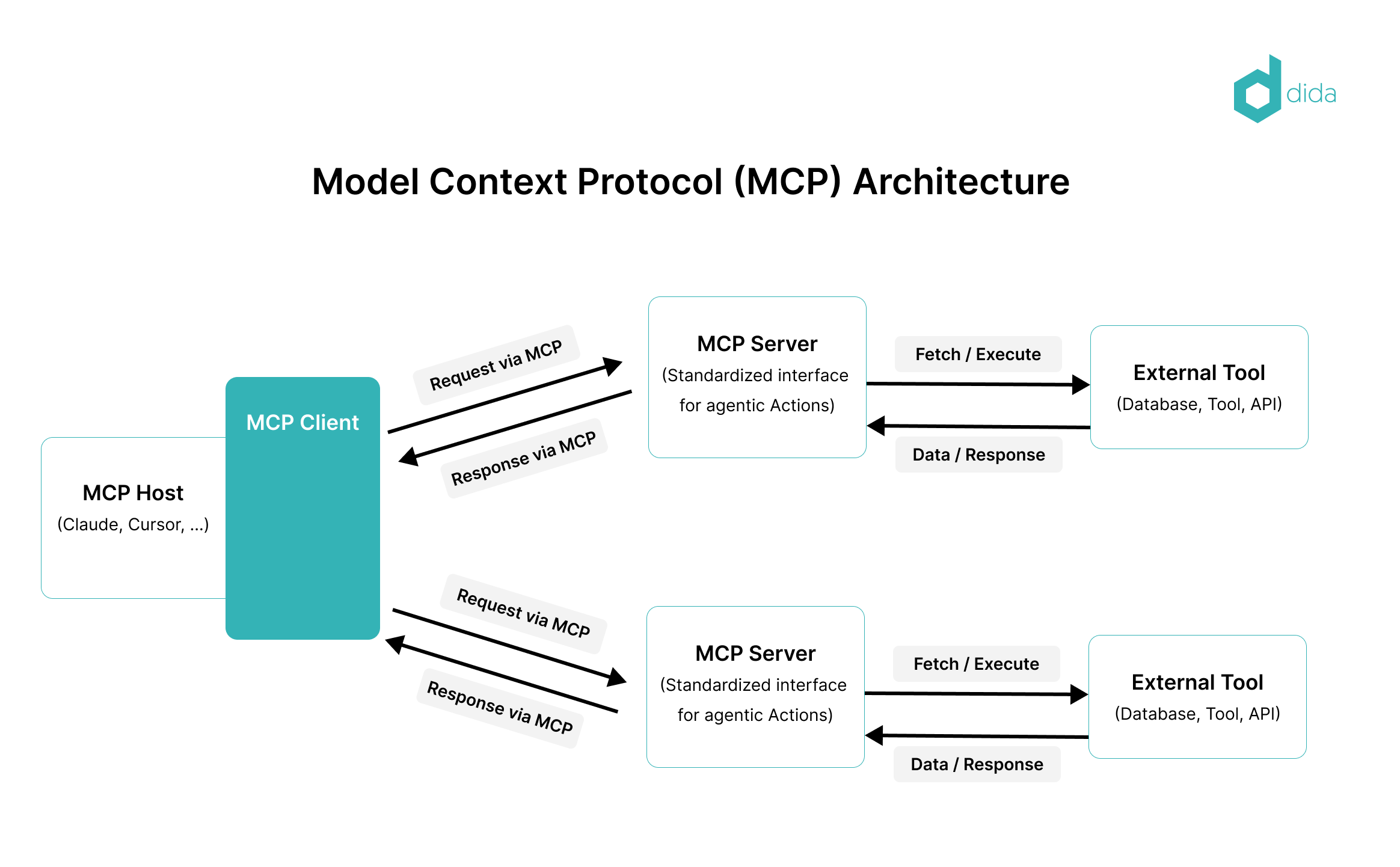
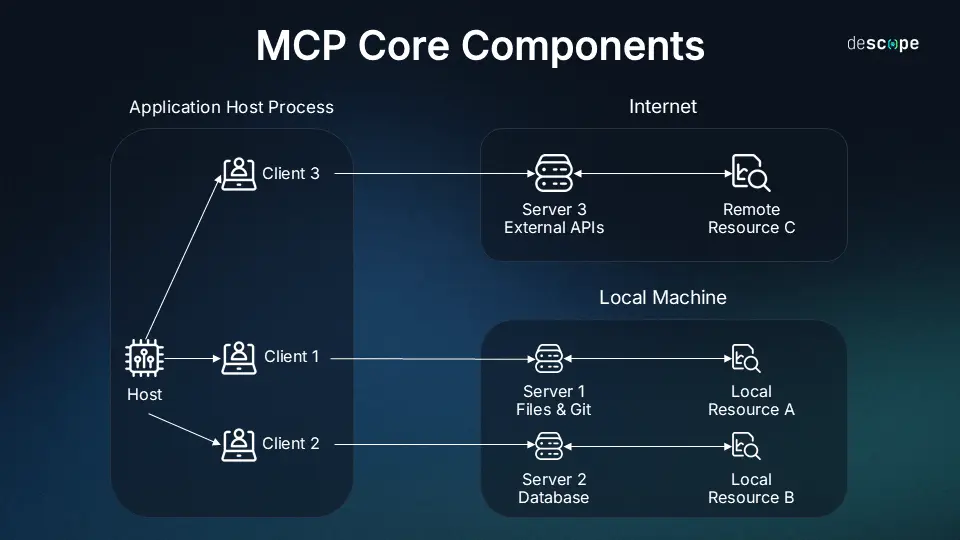
- **MCP host** is the environment where the AI runs (Claude Desktop, Cursor, VS Code with Copilot, ChatGPT, and others).
- **MCP client** is the "brain" inside the host that establishes the connection.
- **MCP server** is a lightweight service (local or cloud-based) that provides the AI with access to specific resources: files, databases, APIs, or even ready-made prompts.
The USB-C analogy is perfect: previously, every device needed its own cable and adapter. Now, there is one port, and you can connect anything. Similarly, MCP replaces dozens of custom integrations with a single universal protocol.
[](https://kb.iqbid.io/uploads/images/gallery/2026-03/image-1774364860926.png)
The server can provide three types of capabilities:
1. **Resources** — data (files, SQL results, GitHub searches).
2. **Tools** — actions (run a script, send a Slack message, create a PR).
3. **Prompts** — ready-made instruction templates for repetitive tasks.
Everything works on a client-server architecture with two-way communication. The AI requests — the server responds in a standardized format. Security is top-notch: data does not go to the model's "cloud", and actions require user confirmation.
[](https://kb.iqbid.io/uploads/images/gallery/2026-03/image-1774364885476.png)
The protocol is completely open-source. The official website, modelcontextprotocol.io, offers SDKs, ready-made servers, and an inspector for debugging. Support is already available in Claude, OpenAI, Cursor, VS Code, and dozens of other tools.
### Why MCP Servers Are Needed
Before MCP, AI agent developers faced a real headache:
- **Massive prompts** — to give the model context, gigabytes of text had to be shoved into the request.
- **Custom integrations** — separate code was written for each tool (GitHub, Postgres, Slack).
- **Model isolation** — the LLM only knew what it was trained on, plus data freshness was questionable.
- **Security** — passing sensitive data in prompts is risky.
An MCP server solves all of this in one fell swoop:
- **Universality** — one server works with all compatible AIs.
- **Real-time access** — the model gets fresh data right now, not from a 2023 training dataset.
- **Scalability** — you can connect 10 servers simultaneously (files + database + calendar + Git).
- **Security and control** — the server keeps the data locally, the AI receives only what is needed, and only with permission.
- **Ease of development** — any developer can create an MCP server for their service in an evening using Claude 3.5 Sonnet.
As a result, AI ceases to be "just a chatbot" and becomes a true **agent** that can act within your digital world.
### Why Everyone Will Be Talking About Them Soon
MCP is not just another "feature" from a single company. It is a fundamental standard that changes the rules of the game.
1. **Rapid ecosystem**. Ready-made servers already exist for Google Drive, Slack, GitHub, Postgres, Git, Puppeteer, Jira, n8n, and even Minecraft. New ones appear weekly.
2. **Support from giants**. Claude, ChatGPT, Cursor, VS Code, Windsurf — all have added MCP support. Developers no longer have to choose "which AI to write an integration for".
3. **Transition from chats to agents**. In 2025, everyone is talking about AI agents. MCP is their "hands and eyes". Without a standard, agents remained a toy. With MCP, they become production tools.
4. **Open-source effect**. Just as REST API once revolutionized the web, MCP is revolutionizing AI. Anyone can create a server and publish it — the community is growing exponentially.
5. **Business value**. Companies realize: instead of expensive custom development of RAG systems, they can simply spin up an MCP server and give Claude access to corporate data. The savings in time and money are enormous.
In the next 6–12 months, MCP servers will become as much of a must-have as Docker or Kubernetes in DevOps. They will be written about in Habr, Reddit, YouTube tutorials, and corporate reports.
### Real-World Use Cases of MCP Servers
**1. Development and DevOps**
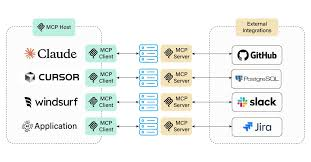
An MCP server for GitHub allows the AI to:
- search for files in a repository,
- create branches and PRs,
- analyze code,
- run tests.
Cursor + Git MCP server = AI that writes a feature from task to merge on its own. Similarly, servers for Git and Postgres work — the AI can make SQL queries and immediately apply changes.
[](https://kb.iqbid.io/uploads/images/gallery/2026-03/image-1774364912232.png)
**2. Corporate Data and Analytics**
An enterprise chatbot connects to:
- Google Drive (reading documents),
- Slack (chat summaries),
- Confluence/Jira (tasks and documentation).
Example: a manager asks "What deals were closed today?" — the AI checks the CRM, Slack, and database via MCP servers and provides a full report.
[](https://kb.iqbid.io/uploads/images/gallery/2026-03/image-1774364926189.png)
**3. Local and Personal Tasks**
A local MCP server provides access to files on the computer, calendar, and email. Claude Desktop + file server = AI that can analyze all your notes and generate a report.
**4. Unusual and Creative Applications**
- **Minecraft MCP server** (based on Mineflayer): AI controls a character in the game — builds houses, explores the world via text commands.
- **Kubernetes MCP server**: AI analyzes the cluster, finds errors, and suggests fixes right in VS Code.
- **Automation with n8n**: The MCP server runs complex scenarios (web scraping, notifications, integrations).
**5. Scientific Research**
Servers for arXiv and Brave Search allow the AI to instantly find fresh articles and current news.
### Conclusion: The Future Is Already Here
MCP servers are not just hype. They are the infrastructure that turns isolated language models into truly useful digital assistants. They solve the main problem of 2020s AI — detachment from the real world — and do so elegantly, securely, and universally.
If you are a developer, start with the official server repository and Claude Desktop. If you are a business owner, think about what data and tools you could "open up" to AI via MCP. Soon, this will become a competitive advantage.
MCP is not just a protocol. It is a bridge between artificial intelligence and your digital world. And this bridge is already built. All that remains is to connect.
# Marketing
# LTV (Lifetime Value)
LTV (Lifetime Value) is the lifetime value of a customer, that is, the total profit a company makes from a single customer over the entire period of their relationship, from the first purchase to the last. This metric helps to understand how profitable it is to work with each customer and how to plan the expenses for acquiring new ones.
##### What it shows
LTV reflects the total amount of money a customer will spend on the company's products or services from the first purchase to the last.
##### Why calculate it
Understanding LTV allows a business to optimize marketing strategies, evaluate the effectiveness of advertising campaigns, and determine how much can be spent on acquiring new customers to make it profitable.
##### How to calculate LTV
To calculate LTV, you need to know the revenue from one person (ARPU) and the amounts spent on acquiring (CAC) and retaining (CRR) them.
**ARPU (average revenue per user)** — the average revenue from one buyer. To calculate it, you need to divide the total revenue for a specific period by the number of people who made a purchase during that period.
**CAC (customer acquisition cost)** — the cost of acquiring one user. To find out, you need to divide the advertising expenses by the number of new users.
**CRR (customer retention rate)** — the proportion of people who use the company's goods and services in a specific period. To calculate CRR, you need to subtract the number of new customers from the total number of customers at the end of the period. After that, divide the resulting number by the number of users at the beginning of the period and multiply by 100%.
When you have ARPU, CAC, and CRR, you can use the formula and calculate lifetime value:
*LTV = Revenue over the entire «lifetime» of the customer − Costs of acquiring and retaining them*
##### Let's calculate with an example.
Given: an online store of office equipment and consumables.
A customer placed their first order for 15,000. Acquiring them cost 1,000, and the cost of goods was 11,000.
Later, they bought consumables for 400. The cost of retaining them was 60 ₽, and the materials themselves cost 50.
Let's calculate the revenue the customer brought when they placed the first order. To do this, we subtract the cost of goods (11,000) and acquisition costs (1,000) from the average check of 15,000. We get 3,000.
Let's estimate how much money the person brought when they made the second purchase. By analogy with the first order, we subtract the cost of goods (50) and retention costs (60) from the average check of 400. It turns out to be 290.
Let's see what total revenue the online store received for both orders. We add 290 to 3,000 and get 3,290 from one customer. This is how you can calculate the profit after subsequent purchases made by the customer.
# CIR (Cost-income ratio)
**CIR (Cost/Income Ratio)** - is a metric that reflects business operational efficiency. It is calculated as the ratio of operating expenses to operating income. The lower the CIR, the higher the efficiency.
#### How to calculate CIR:
CIR = (Total Costs / Total Revenue).
##### Example:
If a company's total costs are 100,000 USD and total revenue is 200,000 USD, then CIR = 100,000 / 200,000 = 0.5. This means that for every 50 USD in costs, the company generates 100 USD in revenue, which is a good result.
#### Why this is an important metric
By analyzing CIR, you can determine how efficiently a company spends its resources on acquiring and servicing customers.
The optimal CIR in online business is a metric that reflects the efficiency of resource utilization. Striving to reduce CIR is a key factor in increasing profitability and ensuring sustainable business growth.
> **For a successful online business, the CIR should be below 1, for example, 0.75, which means that for every 0.75 USD in costs, there is 1 USD in revenue.**
#### How to improve CIR:
##### Reducing Costs
- Optimizing marketing campaigns to attract more customers at a lower cost.
- Improving the efficiency of operational processes to reduce customer service expenses.
- Automating processes to minimize manual labor and lower costs.
##### Increasing Revenue
- Increasing the average order value by offering additional products or services.
- Improving website conversion rates so that more visitors become buyers.
- Enhancing customer loyalty to encourage repeat purchases.
# What is Due diligence?
**Due diligence** — a comprehensive review of a business or asset prior to a major transaction (purchase, investment) to identify all possible legal, financial, tax, and reputational risks. Essentially, it is an in-depth analysis that allows for obtaining the most complete and objective information about the target in order to make a well-considered decision and minimize potential losses.
##### What happens during the process?
- Experts (lawyers, financial professionals, auditors) examine all aspects of the company's operations:
Financial condition: analyze financial statements, verify debts and assets.
- Legal aspects: review the legality of operations, the presence of litigation, and ownership rights to assets.
- Tax review: analyze tax returns and potential risks of tax claims.
- Reputation: verify the reliability and transparency of the company.
- Other: depending on the target, this may include technical, environmental, or marketing assessments.
##### Why is this needed?
- Risk reduction: identifies potential problems that could lead to financial losses.
- Valuation: helps to understand the true value of the target and negotiate the transaction price.
- Informed decision: provides a complete picture of the business or asset, allowing for a well-considered decision on the feasibility of the transaction.
- Deal preparation: can assist in negotiations and preparation for selling the company or attracting investments.
# Various
# What is a PWA application?
PWA, or Progressive Web App, is a technology that allows customers to install a full-fledged mobile application on their smartphone without the need to publish the app in the App Store or Google Play.
Now there is no need to develop separate applications for iOS and Android. It is enough to have and maintain a «progressive web application».
Mobile applications based on PWA are used more often than it seems at first glance. Twitter, Tinder, Uber, Telegram, Starbucks, Forbes, AliExpress, and Aviasales use PWA-based applications as a foundation or as a supplement to their mobile application.
### Advantages of a PWA Application
1. Development and maintenance are 70% cheaper than for mobile applications.
2. The technology allows sending push notifications.
3. Savings related to customer re-engagement, as there are no costs associated with customer return tools (retargeting, remarketing).
4. No need to publish the application in the App Store and Google Play. You can download it directly from the website.
5. Works significantly faster than a website.
6. Works without the internet.
7. The size of a PWA application is usually less than 1 MB, which is smaller than a mobile application.
8. The PWA application works with the following features: geolocation, camera, microphone.
### What tasks does PWA solve?
- Drive repeat sales.
- Make it easier to find your company. Get access to the company with 1 tap on the screen.
- Increase brand awareness. The company symbol (logo) is always visible to the user.
- Increase your average order value by boosting product sales through push notifications.
- Stay connected with the customer. Send the customer notifications about product arrival at the time of pickup. Or that the product will be delivered today.
- Save on advertising. You no longer need to set up retargeting ads with a new advertising campaign. Just send a notification that your customers are sure to notice.
- Eliminate competition in search results. Your customers connect through an application that has no competitors, unlike search results.
### Additionally
- PWA can be downloaded and promoted on Google Play.
- PWA can be created for a part of the website.
- The application is updated using cache, i.e., every time the user opens the application with the internet enabled.
# What is Bootstrap?
[**Bootstrap**](https://getbootstrap.com/) is the most popular HTML, CSS, and JS framework for developing mobile-first projects.
[**Bootstrap**](https://getbootstrap.com/) is the most used framework in various projects around the world. Its closest competitor has a community several times smaller. In [**Bootstrap**](https://getbootstrap.com/) ready-made CSS styles and JS scripts are provided, to apply which you just need to specify the necessary style classes and attributes for HTML elements.
[**Bootstrap**](https://getbootstrap.com/) is primarily known for its excellent responsive properties for working on mobile projects. All thanks to the famous [**Bootstrap**](https://getbootstrap.com/) grid, which allows you to easily adapt any website and display it well on any device.
##### What is Bootstrap used for?
In general, to better understand why you need [**Bootstrap**](https://getbootstrap.com/), we can go back a bit and answer the question: “What is a CSS framework in general?”
Essentially, in simple terms, it is a file or several files with ready-made code that are connected to the website in the head section, after which you gain the ability to use the features of this framework.
Frameworks are created to make it easier for other web developers to build websites. I already mentioned at the beginning that today almost any developer, having built a couple of websites from scratch, thinks about how to speed up the development process.
The fact is that if we are going to develop a website from scratch, we will have to take care of many things. All CSS styles and web scripts will have to be written from scratch, which can amount to hundreds or thousands of lines of code. Moreover, you can make a lot of mistakes in the layout. For example, your template will simply look different in major browsers or will not respond to queries.
In general, just for the sake of a responsive layout, you should use [**Bootstrap**](https://getbootstrap.com/), because if we are talking about fixed layouts, they are easy to create even from scratch. We just create blocks, give them a fixed width, and work with the layout.
But in the case of responsive layout, everything is much more complicated. You will need to ensure that your website displays correctly at any screen resolution. For this, you will need to use media queries. For larger projects, you may need many such queries, plus you will still have to learn how to write them.
In general, when you develop a responsive layout from scratch, you will have to work hard, and your layout skills must be quite high.
But what about Bootstrap? If you learn this framework, it will significantly simplify the layout for you. First of all, the framework takes care of cross-browser compatibility and performance, which are the main things a developer should care about. But with Bootstrap, they are very easy to implement. This allows creating an HTML template even for a person who has previously done very little layout work and is not particularly familiar with CSS.
Secondly, the structure is ideal for teamwork. With the right skills and understanding, coding in Bootstrap is 3-5 times faster, and code consistency will allow any of your colleagues to make changes. If we are talking about a layout without a framework, each developer may have their own style, and someone else will have to spend some time studying their code.
As an advantage of the structure, I would also like to highlight the large Russian-speaking community and the availability of good documentation in our language. Thanks to such prevalence, many templates have appeared for [**Bootstrap**](https://getbootstrap.com/), where the design of all main elements has already been reworked. You can connect these templates and build your websites based on them, just changing something slightly.